AI for development applications, building permits and planning approvals
Explore applicant guidance and council review workflows with DAISY. Confirm the supported scope, source evidence and human approval responsibilities before relying on the result.

The development application process is broken.
Slow approvals
Assessments stall housing supply and local investment.
Stretched capacity
Staff shortages and churn leave teams thin.
Rising expectations
Communities want faster, clearer and more consistent service.
How DAISY Assist works
Five steps take an applicant from a first question to an application that is ready to lodge. Pick a step to see it.
- 1Q&A
- 2Planning Pathway
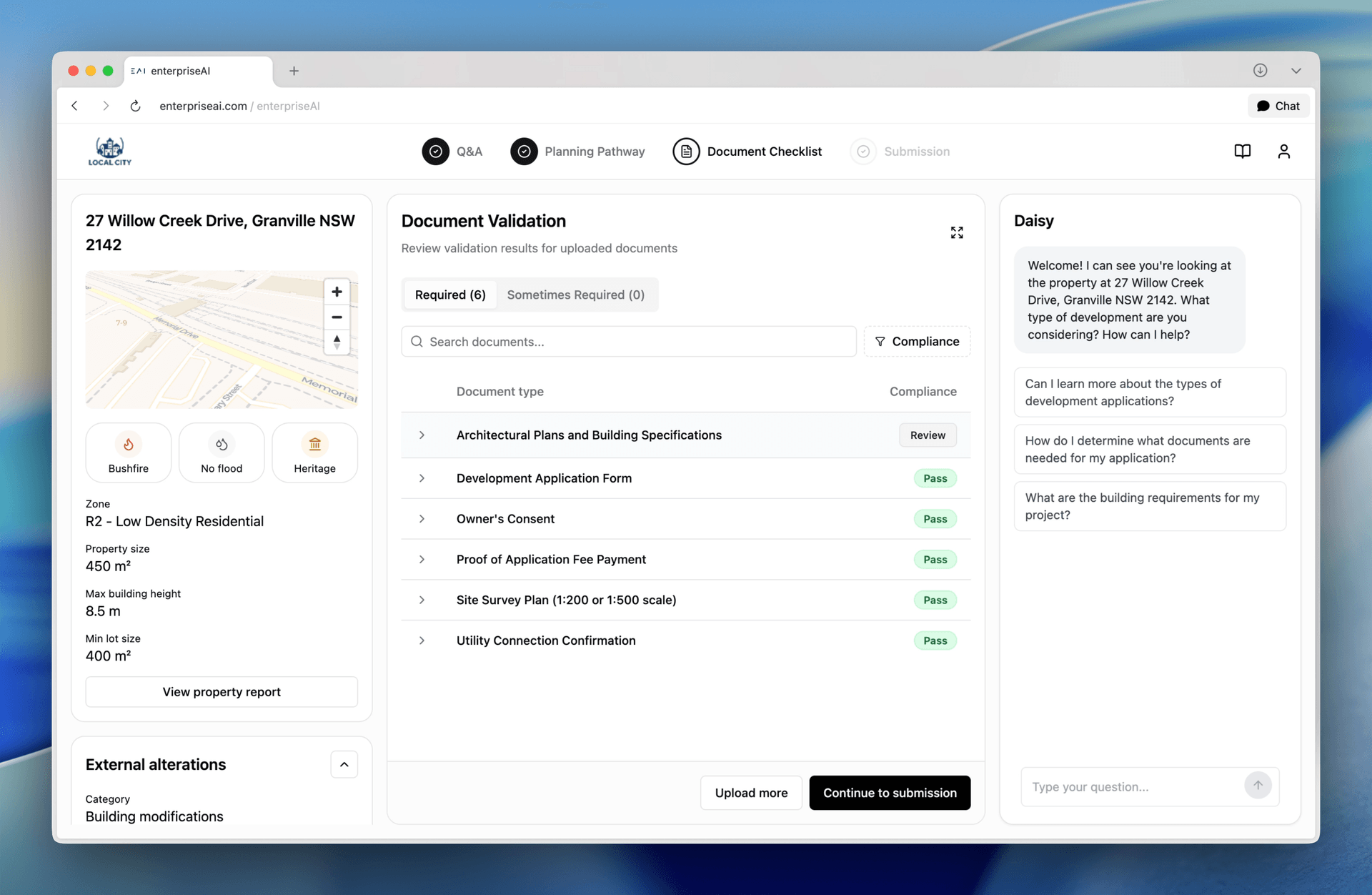
- 3Document Checklist
- 4Submission
Welcome! I can see you're looking at the property at 27 Willow Creek Drive, Granville NSW 2142. What type of development are you considering? How can I help?
What are the building requirements for my project?
The proposed building height is 12.8m against a maximum standard of 11m, representing a 16.4% variation. The submitted Clause 4.6 written request argues the variation is justified given the site’s topography.
Document References:Cumberland Local Environmental Plan 2021 (Page 12)“Zone R2 Low Density Residential – objectives and permitted land uses”Cumberland Development Control Plan 2021 (Page 3)“Part 3 - General controls for residential development”How DAISY Assess works
Five steps take a planner from a new application to a determination, with the decision still theirs. Pick a step to see it.
- This year
- 30 days
- This month
- 6 days
- At risk
- 2/10
- This year
- 140 days
- This month
- 100 days
- At risk
- 5/20
One workflow, not another window.
Confirm the systems of record, supported interfaces and integration responsibilities for your DAISY scope.
 Planning Portal


 Planning Portal
A rollout plan for your council
Scope, integration, review, training and go-live timing are agreed for each deployment.
Evaluate the DA journey with the same sample cases
Wingecarribee Shire Council
Quantified customer outcome evidence is under evidence review. The workflow description remains available without the disputed figures.
Named council attribution; outcome evidence under review
Wingecarribee Shire Council
Evaluate one planning workflow before expanding
Start with a real operating baseline
Choose one planning enquiry or document-review task. Record preparation time, missing evidence and reviewer corrections before assessing a new approach.
Test the supported workflow
Ask the provider to demonstrate your chosen task with complete, incomplete and conflicting sample information. Record what works, what needs correction and what is outside the scope.
Confirm the local requirements
Identify the jurisdiction, relevant planning instruments and authoritative sources. Confirm supported rules and integration responsibilities for that scope before proceeding.
Prepare a useful DAISY evaluation
Define the applicant question, source documents and planning review step you want to assess. Agree the intended output and the person who can accept or correct it.
Use fictitious material for an initial exercise: case A includes a current checklist and all requested documents; case B lacks one requested document; case C includes two conflicting checklist versions. These cases are evaluation prompts, not product outputs or planning advice.
Expected checks: A produces a source-linked summary for human review; B identifies the missing document without inventing it; C flags the conflicting versions for resolution. Ask the provider to demonstrate these checks. The authorised planner determines the applicable requirements and any next action.
Bring these items to the review
- One applicant question and the current manual response
- The source owner and current checklist version
- Complete, missing and conflicting sample cases
- A named reviewer and escalation route
- Required interfaces and permission boundaries
- A baseline for preparation time, gaps and corrections
- Confirm jurisdiction-specific permitting requirements and product fit
Questions for a planning workflow evaluation
Can DAISY help with AI building permits and planning approvals?
Discuss the application, permit or approval workflow with the provider. Use representative sample documents to assess preparation guidance, document review and referral support; confirm the supported scope and keep decisions with authorised reviewers.
How do we decide whether a trial workflow is useful?
Compare the demonstrated workflow with your baseline. Count missed evidence, unsupported answers and reviewer corrections, alongside preparation time. Keep the current process if the proposed workflow does not improve the task or the required controls cannot be demonstrated.
Can DAISY work outside NSW or Australia?
Confirm support for the proposed jurisdiction, planning instruments and permitting workflow with the application provider. Review local rules, required sources and human approval responsibilities before agreeing a deployment.
Does DAISY replace council planners or certifiers?
No. The council source describes DAISY as supporting planners, not replacing them or making final decisions. Confirm the review, correction and approval steps for your proposed workflow.
DAISY application and DAISY AI workflow patterns
When people search for a DAISY application or DAISY AI, they are usually looking for a production application, not a generic chatbot. DAISY is the EnterpriseAI application pattern for guided intake, document checks, workflow assistance and human review.
The current DAISY page remains the canonical destination. This section makes the application intent explicit without replacing the existing development application, building permit and planning approval content.
Where DAISY AI helps
- Guided intake where users need to understand what information and evidence to provide
- Document review workflows where completeness, consistency and escalation matter
- Planning, permitting, onboarding, compliance and service workflows that need human decision ownership
- Operational improvement where teams need analytics on where users get stuck
Book a consultation
Choose a time that works for you and meet with our team.
Product profile and evidence sources
Applicant assistance and planner review
The MAV profile describes DAISY explaining planning rules, identifying controls and documents, checking submissions and helping residents navigate the NSW Planning Portal while planners retain decisions. Reviewed 6 September 2026. Use Assist for the applicant-facing evaluation and Assess for planner review; confirm configured interfaces, current source rules and approval ownership for your council.
Read the public DAISY profileApplication and platform roles
ADAPTOVATE describes DAISY as its development assessment system, built on Enterprise AI, with guidance on planning rules, document requirements and validation. Reviewed 6 September 2026. Confirm who supplies the application, connects each system and supports your deployment before agreeing scope.
Read the partner announcementWhat the quoted evidence establishes
The linked 2025 PIA award source is the attribution for the award quotation above. Council quotations retain their named attribution; verification pending means they are not independently verified outcome evidence. Product descriptions and award recognition do not establish a result for your deployment. Quantified customer outcomes remain under evidence review; the sample cases are proposed checks, not completed demonstrations.
Read the attributed PIA award source